

To view all staff details select “Staff Details” from the “Users” menu.
Read the Customer Help Guide on Staff Details. You may also like to read the Customer Help Guide on Staff Librarians.
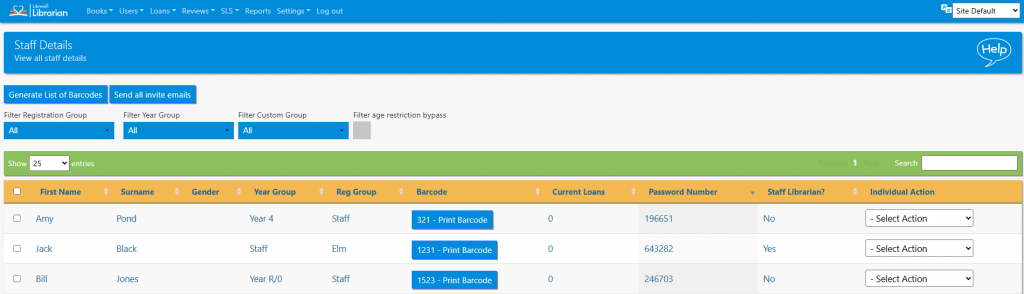
The list can be sorted by clicking the column headers and can be filtered by registration group, year group and custom group. The list can also be searched in the normal way.
The following actions are accessible for each teacher from the Actions menu…
- View Loans – view a Teacher’s current and past loans
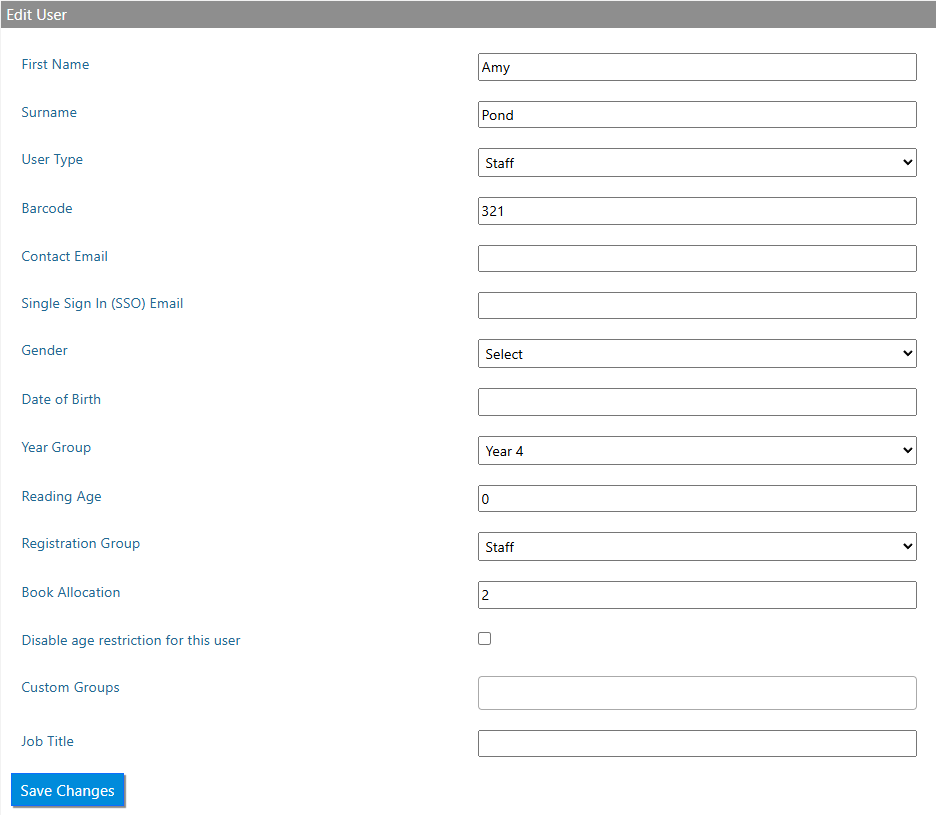
- Edit Teacher – the following data can be added or amended depending on what was included in the data sharing agreement:
- Profile picture – can be edited here (Librarian+ only)
- User Type – student, staff or class
- Barcode
- Contact Email (Librarian+ or email module)
- SSO Email (Only if a school uses Google or Microsoft SSO)
- First Name
- Surname
- Gender
- DOB
- Year Group – the year the student is currently in
- Reading Age – this is used to determine which age-restricted books the teacher can access
- Reg Group – the registration group of the teacher
- Book Allocation – the number of books the teacher is allowed on loan concurrently
- Disable Age Restriction for this user? – age restriction bypass
- Custom Groups – teachers can be part of custom groups too
- Job Title
- View / Add note – this feature allows notes to be added to a user’s profile
- Set Staff as leaver – sends the teacher to the Leavers List. They can be restored at any time
- Set as Staff Librarian – setting a student as a Student Librarian affords them the following extra features if they were to log in:
- Add books
- View others loans
Tasks
- Set a staff member as a leaver
- Check a staff member’s loan history
- Edit a staff member to change their registration group
- Add two staff members to a custom group in one transaction