

Loan limits affect how many books library users can take out and how long they can have these books for.
Read the Customer Help Guide on Loan Limit Settings.
To adjust the loan limits for the various user types go to Loan Limit Settings in the Settings menu.
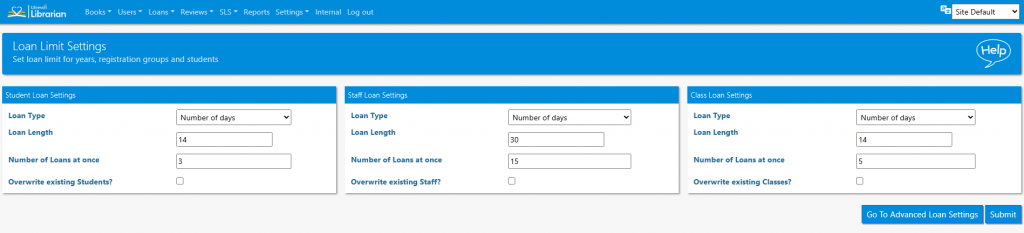
Loan Type – set a number of days, or a fixed date. The latter is useful when approaching the end of term
Loan Length – set the number of days a book is on loan for
Number of loans at once – how many books a user is permitted to have at one time
Overwrite existing student – this box must be checked in order that changes apply to existing users. If not checked, changes will only apply to users added in the future.
Advanced Loan Settings
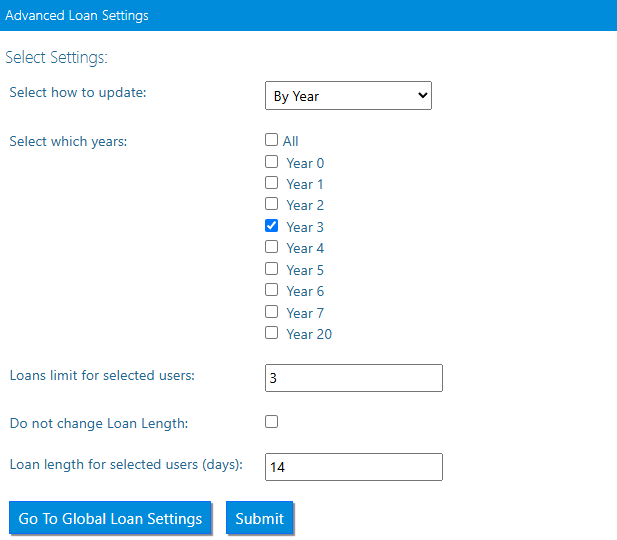
This feature allows the librarian to adjust the loan settings for registration and/or year group. Limits for individuals can be actioned through the individual action of the Student/Teacher Details in the Users menu.
Tasks
- Make a note of the current loan limit for a student (Hint – you can view this information by editing a student’s details)
- Change the Loan Limit Settings for all students to 7 books. Check the student details to make sure you have applied the change successfully
- Toggle Advanced Loan Restrictions on in Library Settings. Note how this changes the Loan Limit Settings page.
- With Advanced Loan Restrictions toggled on, set an advanced loan limit for one resource type.
- With Advanced Loan Restrictions toggled OFF, set a loan limit that affects only one registration group
- Set Year 1 students to have 1 less book allocation than the default allocation
- Set the default loan length for staff to be 1 day