

If set by the Librarian in Settings > Library Settings, library users will be able to reserve books that are not immediately available in the Catalogue (i.e. they are on loan to another user). Librarians can also reserve books on behalf of library users. A list of current reservations can be seen on the Current Reservations page.
Read the Customer Help Guides on Reservations.
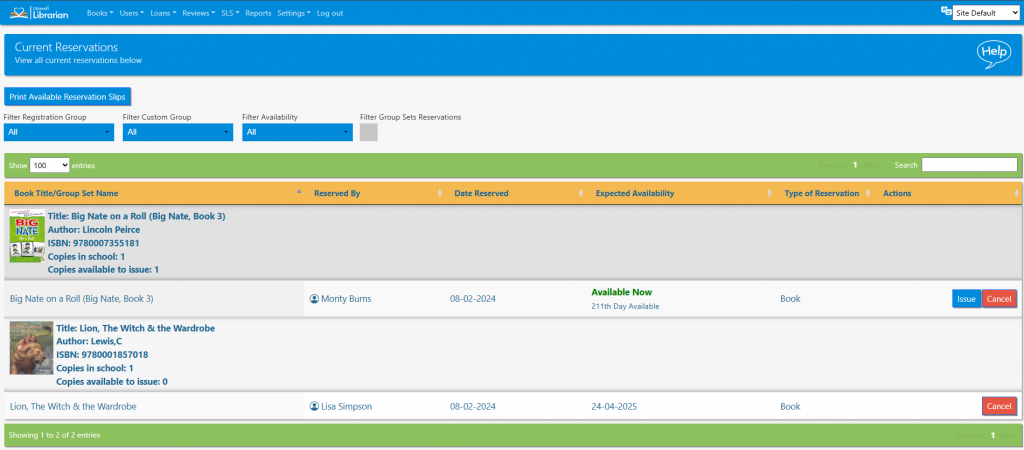
The list can be sorted by clicking on the column headings, filtered by registration group, custom group, availability or searched in the normal way. The Expected Availability column shows when the book is due in, and / or where the student is in the queue.
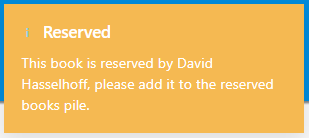
If a book that has been reserved is returned, the librarian will see a pop up message telling them that the book is reserved and by whom.
Reservations can be cancelled by clicking the Cancel button. If a reserved book is attempted to be loaned to a user other than the next reserver, an error will appear (this can be overridden by the librarian).
Tasks
- Cancel a book reservation
- Reserve the same book for two different students. Verify that their reservations both appear on the Current Reservations page
- Issue a reservation
- What happens when a book that has been reserved is returned?
- What happens when you try to issue a reserved book to someone else?